ParentLog
Baby Activity & Development Tracker – Mobile App
Overview
ParentLog is a mobile app designed to help parents track their baby's daily activities based on their individual needs. This includes breastfeeding, pumping, bottle feeding, sleep, and other activities.
The app also supports parents throughout their baby's first year by providing guided developmental activities based on the baby's developmental milestones.
ROLE
Competitive analysis | User Research | Wireframing | Usability Testing | UI design | Prototyping
Understanding the Problem
Parents often begin tracking their baby's activities from birth, but the first few months can be overwhelming, making it difficult to remember and keep track of the many details of their baby's daily routine.
Parents may also need to share this information with other family members, making consistent tracking even more challenging. As a result, important information can be missed, making it harder to understand the baby's daily patterns and needs.
Competitive Analysis
The research examined several product categories, including baby activity trackers, developmental guides, and activity guides for parents. It focused on key aspects such as navigation and orientation, structure, consistency, communication, feedback, and feature sets.


Insights
While analyzing other products, I identified useful features and design patterns that could be relevant to ParentLog, along with the rationale behind them.

Quick-access button for high-frequency actions
A quick-access button can help users quickly reach frequently used actions and reduce the effort required for common tasks.

Data record of the baby's daily activities
Tracking the baby's daily activities can help parents identify patterns in their baby's needs and behavior and better understand their daily routine.

Progress bar feature on the main screen
A progress bar can help users track their progress and encourage continued engagement with the app.
Interviews
I conducted interviews with five women aged 28–38. Most were first-time mothers with babies between 0 and 12 months old

"I have trouble keeping track of my baby's feeding records because they are written in so many places"
Goals
-
Understand whether parents track their baby's activities and which tools they currently use.
-
Identify which activities are tracked most frequently.
-
Understand how parents use the information they track in their daily lives.
-
Understand whether and how parents share this information with other family members.
-
Learn whether parents engage in activities to support their baby's development.
Insights

Disorganized tracking
Mothers tend to use mobile tools such as Notes and WhatsApp to track and share their baby's activities, resulting in scattered information across multiple platforms.

Feeding as the Most Tracked Activity
Feeding was the most commonly tracked activity. Since a mother's feeding method can be a sensitive topic, this needed to be considered when designing the app's onboarding experience.

Limited Awareness of Developmental Activities
Many first-time mothers do not engage in physical development activities with their babies due to a lack of awareness or knowledge.
Ideation Process
Based on the insights gathered from the user research, I focused on two key activities that parents could manage through the app:
Feeding Tracking
Users can track a new feeding session based on the feeding preferences defined during onboarding.
Developmental Activities
Users can follow step-by-step daily activities designed to support their baby's development and track progress through developmental milestones.

Choosing the Feeding Method
During the user research, two of the mothers shared that they were breastfeeding their babies and often pumping breast milk, with a supply stored in their fridge.
I decided to explore this feeding method further and discovered several apps focused on breastfeeding and pumping. I was also surprised to find a large online community where mothers donate breast milk to parents who are experiencing difficulties with breastfeeding, as well as to LGBTQ+ parents.
This finding had a significant impact on the project's direction. It opened up new areas of research and potential features, such as tracking pumped milk supply and enabling breast milk donations. While these features were not part of the MVP, they were important supporting features to consider.
User Flows
-
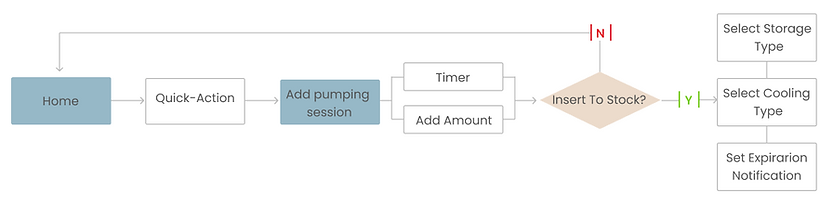
Flow 1: Track a new breastfeeding session, record pumped breast milk, and add the milk bag to the available stock.
-
Flow 2: View the available milk stock and move unused milk bags to the donation stock.
-
Flow 3: Track the baby's developmental milestones through daily activities and monitor progress over time.
Flow 1

Flow 3

Flow 2
Flow 2
View stock data and insert unused milk bags to the app's donations stockpile.
Wireframes & Prototype
The next step was to translate the research insights and user flows into a low-fidelity prototype. The goal was to define the key interactions and validate the flows through usability testing before moving on to the UI design.
Usability Tests
I conducted usability tests at an early stage using a clickable prototype. The goal was to evaluate whether users could navigate and complete the first two flows:
-
Track a New Feeding Session- Track a feeding session with pumped breast milk and add the milk bag to the available stock.
-
Manage Milk Stock and Donations- View the available milk stock and move unused milk bags to the donation stock.
The tests identified several areas for improvement:


Visual Design
Design Guide
Color plays an important role in the app's design, with each activity represented by a distinct color. This helps users quickly identify the activities they have tracked.

Prototype
The wireframes were transformed into high-fidelity screens, followed by the creation of an interactive prototype to demonstrate the app's interaction patterns.
Onboarding
Users are presented with an overview of the app's features. This provides them with a comprehensive understanding of what the app has to offer. Additionally, users have the option to set their personal information within the app, allowing for a personalized experience tailored to their specific needs.
Track a new pumping session
The main screen of the app offers a quick action button for the user to select the pumping session action. By tapping this button, the app automatically provides the default time and date for the pumping session. However, the user also has the option to add additional information to the session, such as the amount of milk expressed and the stock level.
View stock data and insert unused milk bags to the app's donations stockpile
Users can select the pumping action to view data related to their milk production. This feature allows the user to easily manage their stock of milk bags. Additionally, the app provides a functionality where users can contribute unused milk bags to a donation stockpile, which can then be utilized by other mothers in need. This feature promotes a sense of community and enables mothers to support one another by sharing their pumped breastmilk.
Track and monitor the baby's developmental milestones with daily practices
The app provides daily development practices to create interaction between parents and their babies. To motivate users to stay engaged, the app includes a progress bar that visually represents their efforts and encourages them to continue their activities with their baby.
These development practices are accompanied by short explanatory videos that offer guidance and instructions. The videos help parents understand the purpose and technique behind each activity, ensuring they can effectively engage with their baby. Additionally, the app includes a timer feature that allows users to track the duration of each practice session, enabling them to record their progress over important milestones


High Fidelity Screens

Onboarding
Track a new pumping session


View stock data and insert unused milk bags to the app's donations stockpile

Track and monitor the baby's developmental milestones with daily practices
Dark Mode
One of the valuable insights gathered from user research is that mothers actively track their baby's activities during the night, therefore I design dark mode screens for this flow in addition.

Attribute | All pictures & vectors taken from freepik
Project Conclusions
Through this project, I gained a deeper understanding of the importance of UX research and how it is a crucial part of the design process.
What have I learned?
-
I'm Not the User- As a mother myself, this project was close to my heart. I initially wanted to address problems I had personally experienced as a first-time mother. However, conducting user research helped me recognize that other mothers had different needs and pain points that also needed to be considered in the app's design.
-
The Importance of an MVP- One of the key lessons I learned was the importance of focusing on an MVP that addresses the main problem. Initially, I analyzed different apps that helped parents with various aspects of their baby's life and tried to combine many of these ideas into one app. After conducting user research, I shifted my focus to more specific user needs and pain points.