Features Management
Feature Configuration Tool in
Fintech Internal System
Overview
Features Management is an internal tool used by fintech employees to add, edit and configure features for merchants across multiple integration systems.
The existing system had no centralized way to configure features. Users had to navigate between multiple systems and rely on external documentation, making the process time-consuming and prone to errors.
The goal was to create a clear, centralized flow that would allow employees to configure features across different integration systems from one place.
ROLE
UX Design | User Research | Prototyping | Usability Testing | Collaboration
Understanding The Problem
To configure a feature, users had to navigate between 1–4 different integration systems. Each client had a unique configuration, and users relied on external documentation to understand the steps required.
Configuration, Implementation and Tech Support teams had no centralized way to manage these configurations, making the process time-consuming and increasing the risk of errors.
User Research
As part of the user research, I conducted qualitative interviews with internal teams who use the system regularly. These conversations helped uncover their current workflow, pain points, and expectations from the new feature. The insights shaped the design direction and ensured we were solving real problems, not just implementing requirements.
Pain Points
No Centralized Configuration
Users do not have a single place within the internal system to add and configure features for a client.
Dependency on External Documentation
Users need to refer to external documentation to understand the configuration process before applying it in the system.
Manual & Repetitive Process
Users must navigate between multiple systems to complete the configuration, increasing workload and the risk of errors.
Goals
-
Centralize feature configuration, allowing users to configure integrations from one place.
-
Reduce the time and number of steps required to complete configurations.
-
Create a more intuitive and structured workflow.
-
Reduce dependency on external documentation by providing guidance directly within the system.
-
Allow flexibility in the configuration order and system selection.
Ideation Process
Based on the research and identified pain points, I focused on two main areas:
Multiple Integration Systems
Ensuring users could add and configure a feature across multiple integration systems within a single workflow.
Different User Needs
Identifying how different users would interact with the tool, leading to the need for structured add, edit, and view flows.
Design Process
Initial Design
The first approach used a popup-based flow, allowing users to add and configure a feature within a modal window.
Challenges with the Popup Approach
-
Limited Screen Space - Users struggled to work with complex tables and configurations within a small modal window.
-
Lack of Context - Switching between integration systems required multiple steps, creating friction in the workflow.


Second Approach
Full-Screen Flow: Expanded the popup into a full-page layout to provide more space for complex configurations.
Accordion Navigation: Allowed users to choose which integration system to configure first.
System-Specific Configuration: Organized the configuration flow into separate sections for each integration system.


Solution
After identifying the challenges in the accordion-based flow, I implemented a card-based solution to improve clarity and usability.

Prototype
Mockups

Add New Feature
The user clicks on the 'Add Feature' button.

Select Feature
The user selects the feature they want to add to the merchant.
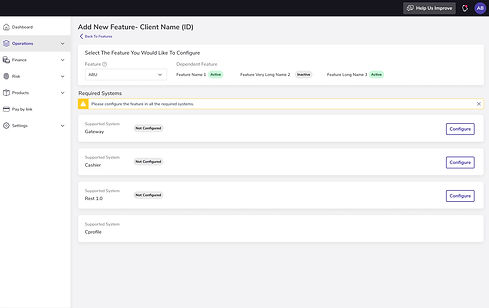
Select Required System
Once the user selects the feature, the supported systems that need to be configured will appear.

Add Integrations
The gateway system requires integration selection before proceeding with the configuration.

Integration Added
The user is now able to select an integration.

Select Integration
Integration selections from different combinations will share the same configuration.
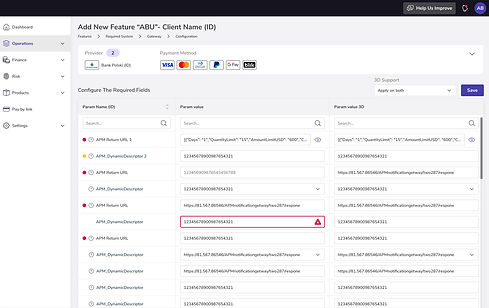
Configuration
Based on the merchant’s name and selected integrations, the system presents the configuration the user needs to add and indicates errors for those that need to be changed.

Configuration Success
Each system saves the configurations separately.

System Configured
Back on the supported systems screen to continue. configured systems will be marked with a badge and can be edited.
Project Conclusions
Through user research, testing different approaches, and refining the flow, I designed a more structured and flexible configuration process for internal users.
The final solution addresses the main pain points identified during the research and provides a centralized way to configure features across multiple integration systems. Further usability testing will help validate the solution and identify areas for improvement.